
Updated: 6 November 2026 | Tested version: 28.2.0 | VPN: Off during the online-feature test
Searching for CapCut without VPN in India? Xafar Studio tested CapCut version 28.2.0 on an Android phone in India with VPN disabled. We checked whether five online asset libraries loaded: Templates, Filters, Video Effects, Stickers and Text Templates. All five displayed their available items during our test. This guide includes nine screenshots from the app, including the version screen, feature panels, editing workspace and export interface.
Test scope: the result applies to the device and connection used for this test. It is not a guarantee that every CapCut feature, account or Indian network will behave identically. We identify what was actually checked and avoid presenting untested services as confirmed.
CapCut 28.2.0 update: what can we confirm?
The version number visible in the supplied Settings screenshot is 28.2.0. That is the build shown on the author’s phone when these screenshots were captured. App versions can differ across devices, regions, distribution channels and rollout stages, so do not assume this is the newest build for every user.
CapCut’s official update guidance recommends checking the update offered through the app store or official CapCut channels. Its public update instructions do not establish that every account receives the same build at the same time. Check the version number on your own device before installing anything.
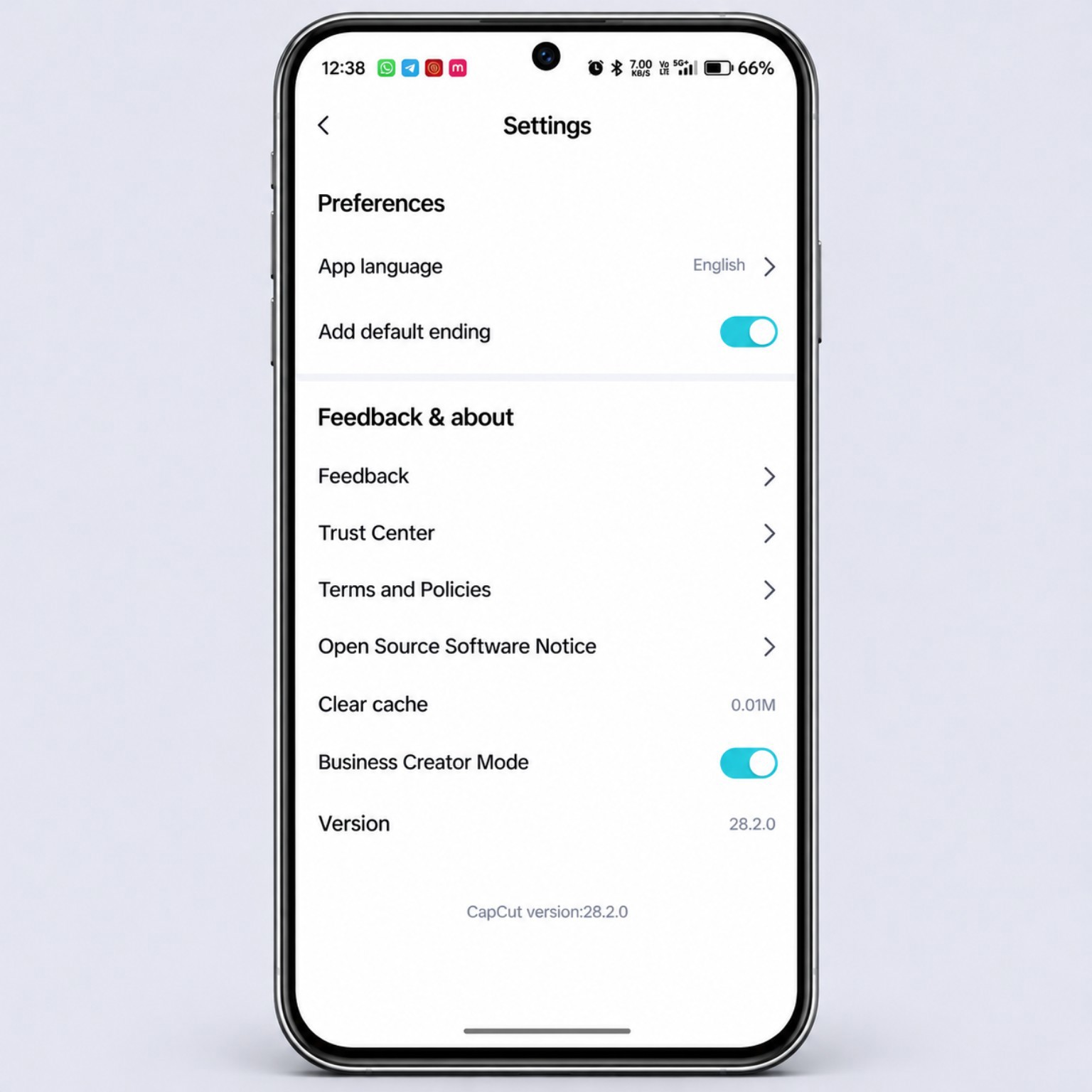
CapCut home screen and available editing tools
The home-screen screenshot shows the main creation options, including New video and Edit photo, alongside shortcuts such as AutoCut, Retouch, AI generator, Photo tools, Auto captions and AI Clipper. The tools visible in an app can vary by account, region, device and server-side rollout.
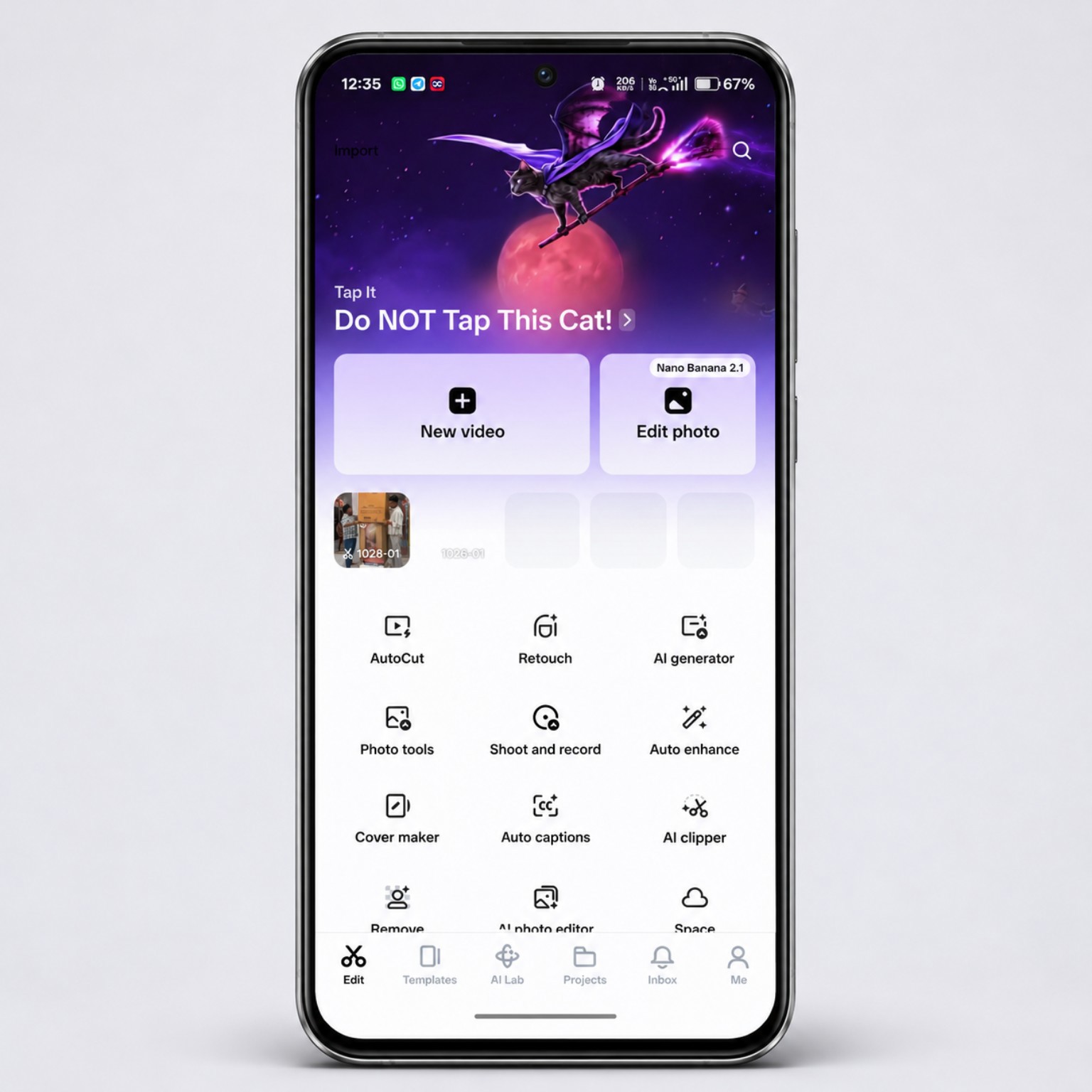
CapCut export settings: resolution, frame rate and bitrate
The supplied export screenshot shows an export panel with AI Ultra HD, resolution choices from 480p to 4K, frame-rate options up to 60 fps and a bitrate control. These are the options visible in this screenshot; availability and final output quality depend on the device, project, source footage and account.
- Resolution: choose a resolution suited to your original footage and where the video will be posted. 1080p is a practical choice for many social videos.
- Frame rate: match the source footage where possible. Use 60 fps when the source and motion justify it, rather than selecting it automatically.
- Bitrate: a higher bitrate can preserve more detail but creates a larger file. Check the exported result instead of relying only on the estimate.
- AI Ultra HD: test the feature on a short clip and inspect faces, edges, text and fine details before exporting a full project.
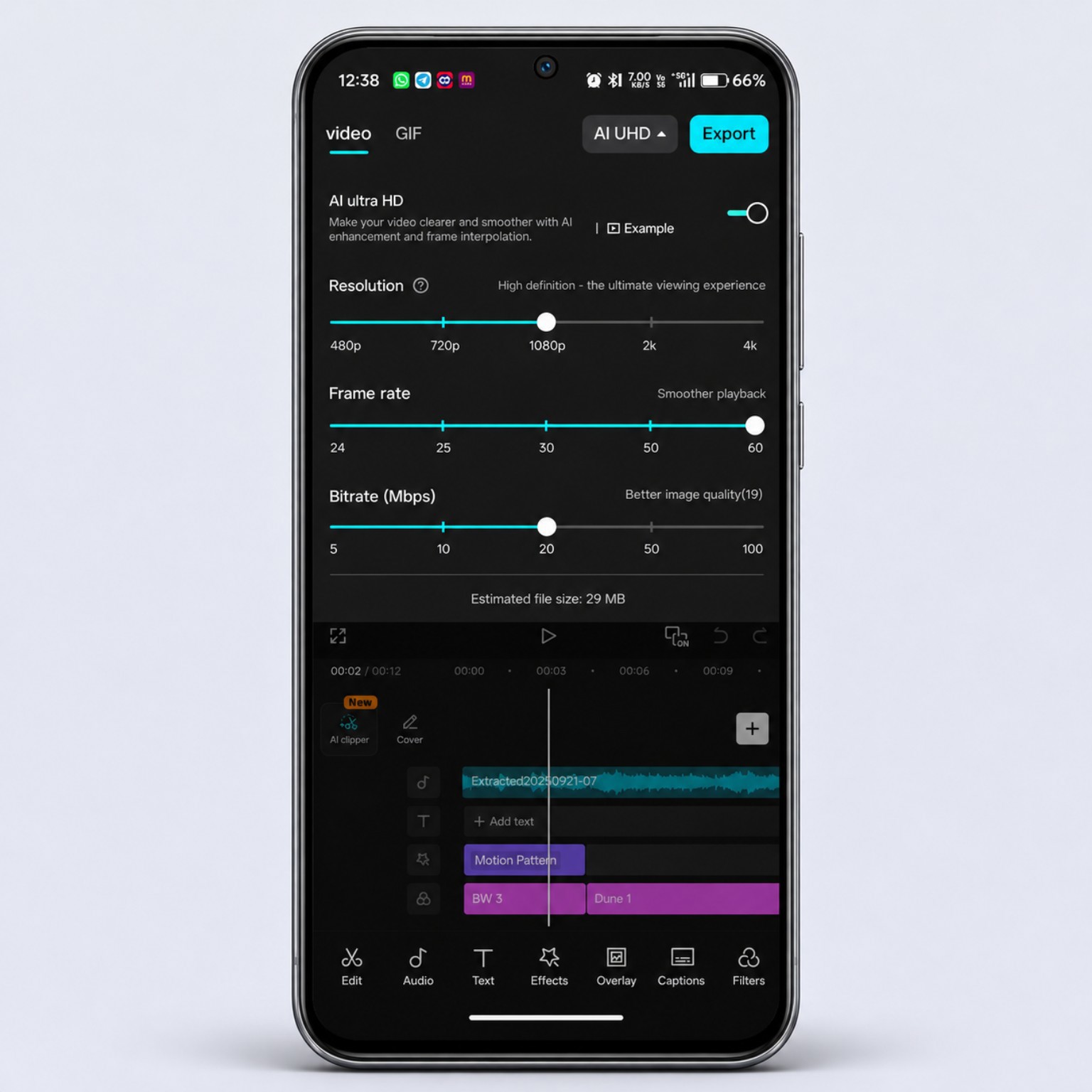
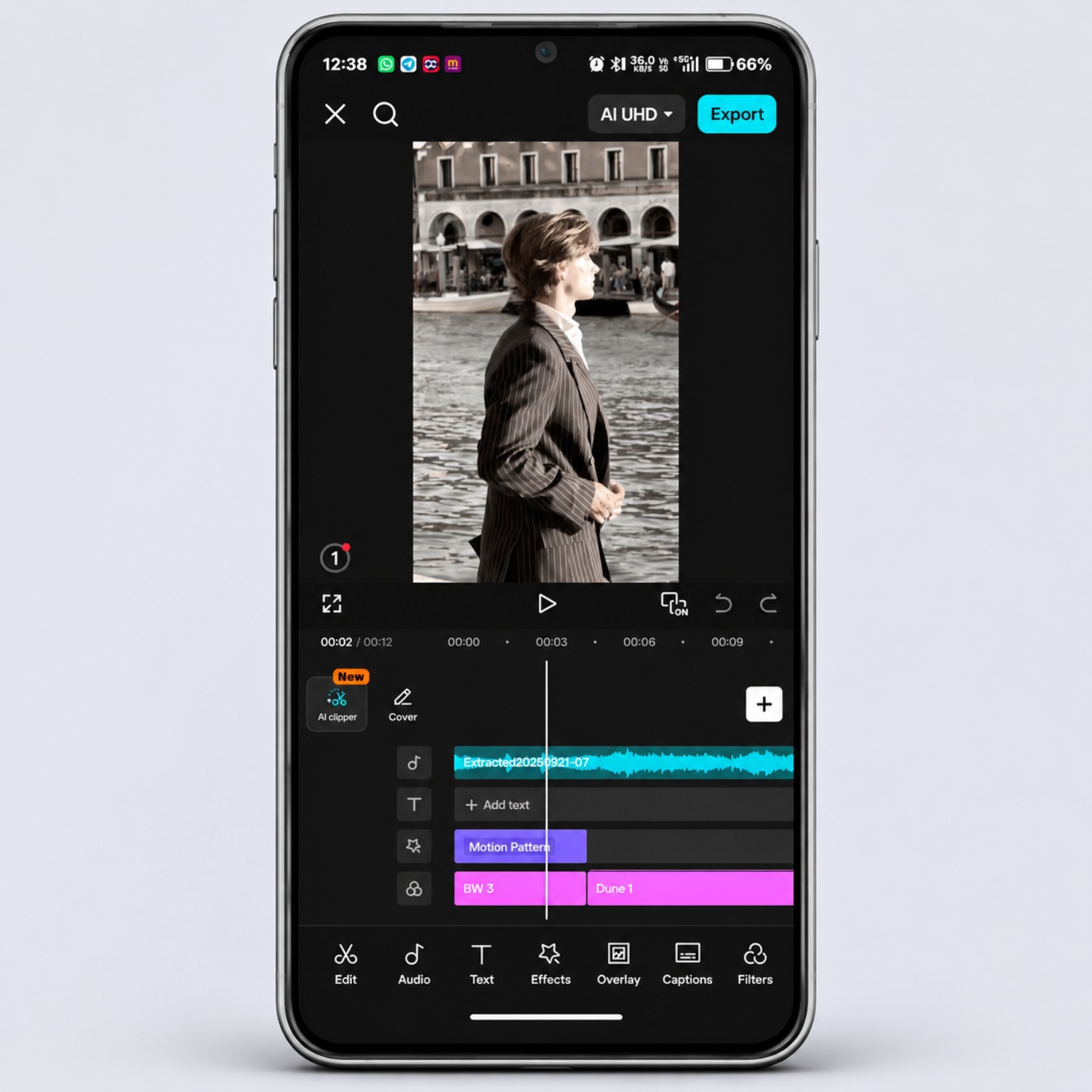
CapCut editing timeline and AI Clipper
The editing screenshot shows a multi-layer timeline with an audio track, text layer and effect layers. It also shows the AI Clipper shortcut and the main editing tools, including Audio, Text, Effects, Overlay, Captions and Filters. This is evidence of the editing interface on the device, but it is not a changelog proving that each tool was newly introduced in version 28.2.0.
Does CapCut 28.2.0 work in India without a VPN?
In our hands-on test, yes. We used CapCut version 28.2.0 on an Android phone in India with the VPN turned off. More importantly, we checked online asset libraries, not just whether the app opened. All five categories below loaded successfully on the tested device:
- Templates: the Templates feed and visible video-template previews loaded.
- Filters: the Filters panel displayed categories and multiple filter previews.
- Video effects: the Video Effects panel displayed trending effects and thumbnails.
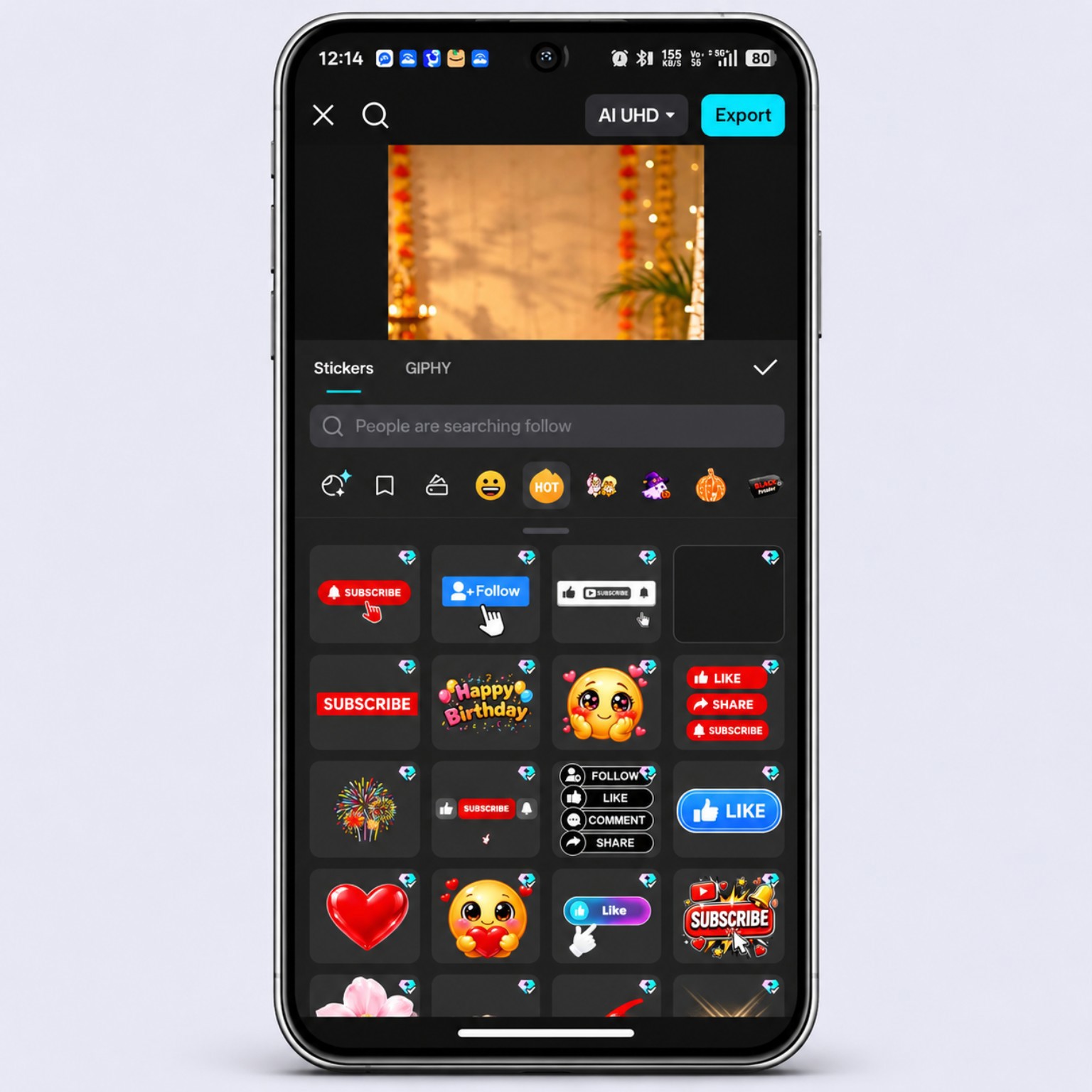
- Stickers: sticker categories and sticker items appeared in the editor.
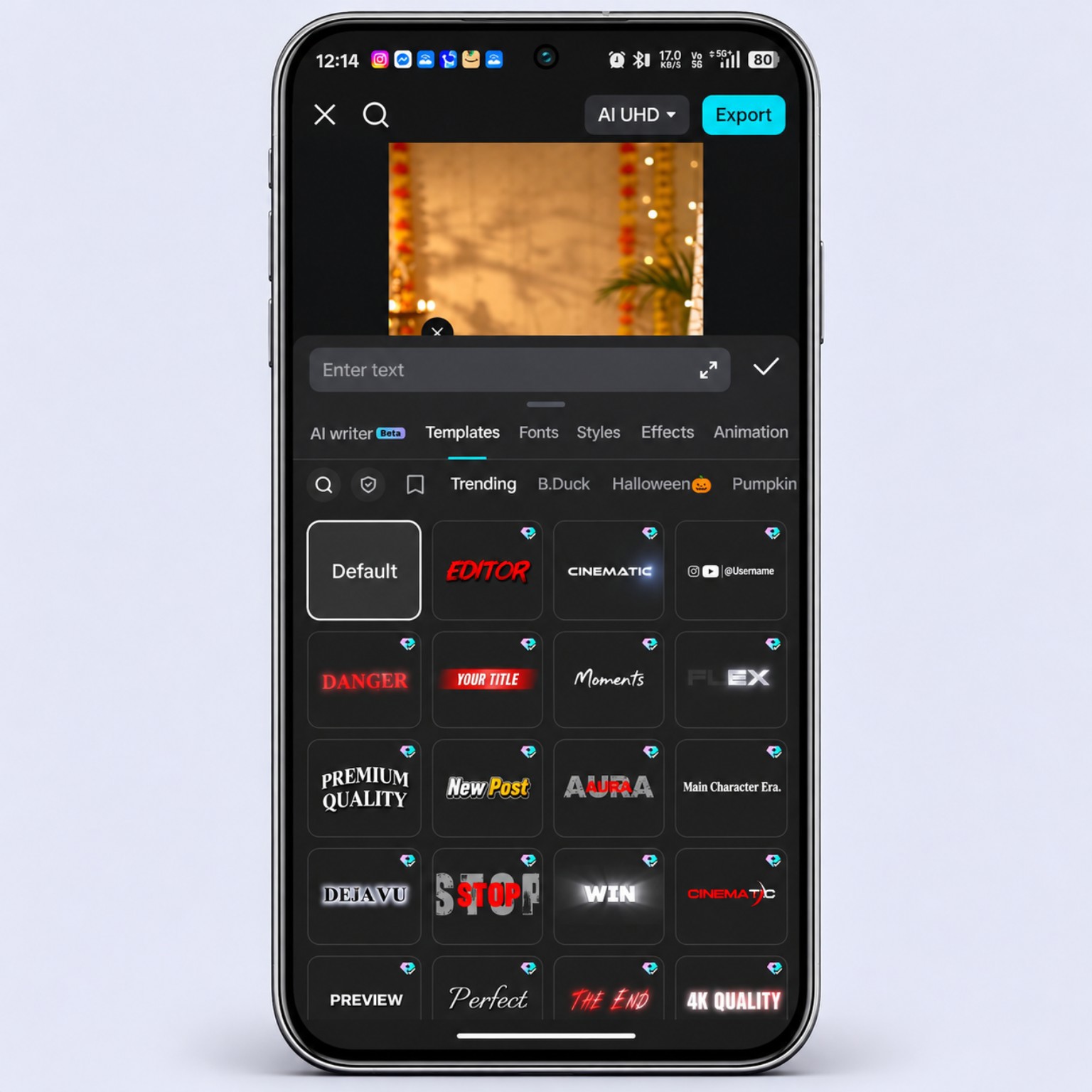
- Text templates: the text-template panel displayed preset title styles and designs.
This is a real-device result from our test, not a guarantee for every user, internet provider, account or future app build. Online availability can vary by network, device, account and service changes.
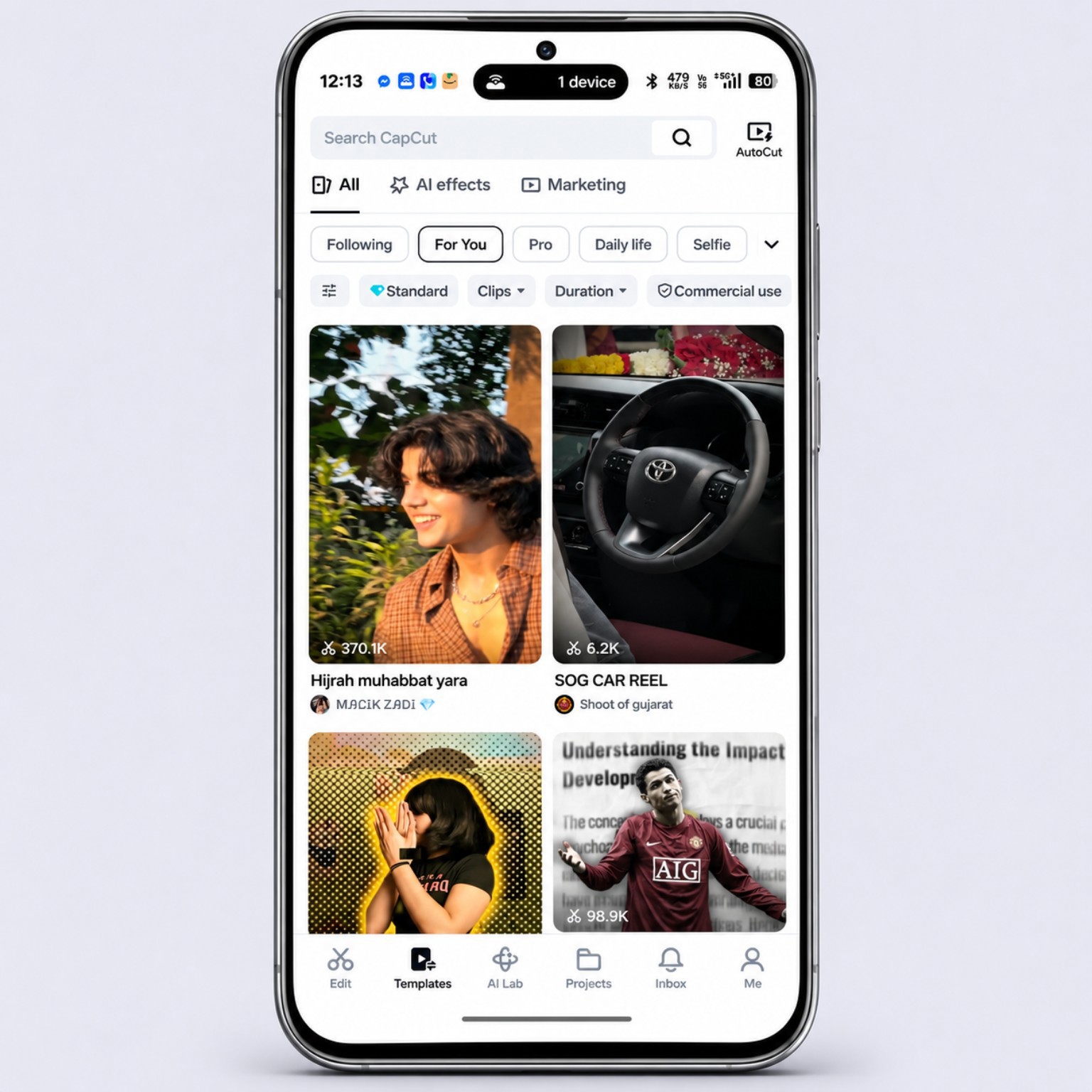
CapCut online templates loaded without VPN
The Templates feed displayed video-template thumbnails and categories during our VPN-off test. You can browse available styles and preview a template before using it. The exact selection may change over time, and individual templates may have account or usage requirements.
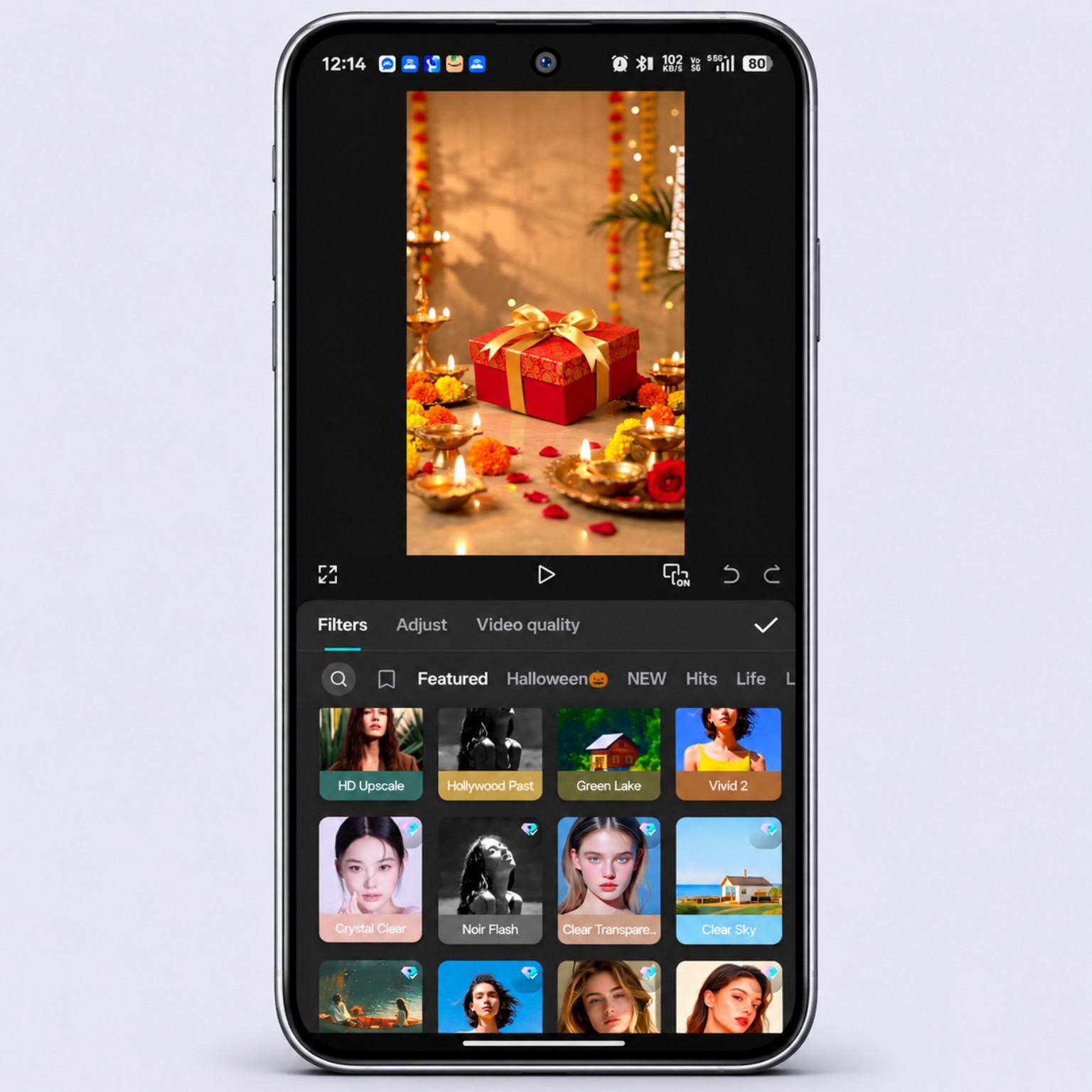
CapCut filters loaded without VPN
The Filters panel displayed multiple filter previews and categories, including looks such as HD Upscale, Hollywood Past, Green Lake, Vivid 2, Crystal Clear and Noir Flash. Filters can change the overall visual tone of a clip. Preview a filter on your footage first and check skin tones, highlights and shadows before applying it throughout a project.
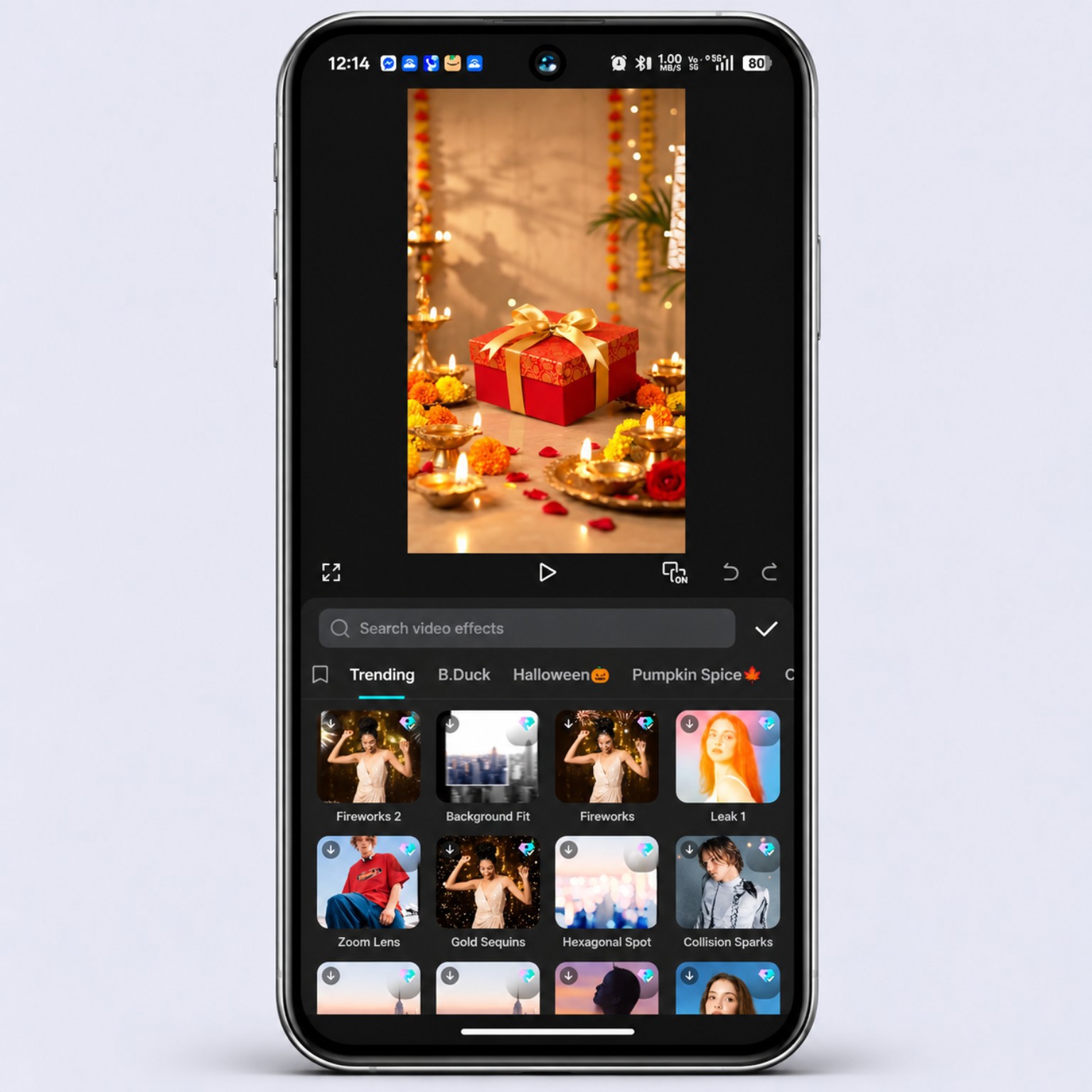
CapCut video effects loaded without VPN
The Video Effects panel displayed its search field, categories and effect thumbnails. Visible examples included Fireworks 2, Background Fit, Fireworks, Leak 1, Zoom Lens, Gold Sequins, Hexagonal Spot and Collision Sparks. Effects can add motion, overlays or stylised changes, whereas filters mainly adjust the overall look of footage. Our screenshot confirms that the panel and its displayed items loaded; we did not individually test every effect in the full catalogue.
CapCut stickers loaded without VPN
The Stickers panel showed sticker categories and multiple sticker items, along with a GIPHY tab. The visible examples included social-media call-to-action stickers, emojis and decorative graphics. Some items may be premium or have separate usage conditions, so check the in-app labels before using assets in commercial content.
CapCut text templates loaded without VPN
The Text Templates panel displayed preset title designs, including styles labelled Editor, Cinematic, Danger, Your Title, Moments, Flex, Premium Quality and New Post. These can help create title cards, intro text and creator labels. Replace the sample wording, keep enough contrast against the video and preview the design before exporting.
How to repeat the CapCut VPN-off test
- Disconnect your VPN and any proxy service.
- Use your normal local mobile-data connection or Wi-Fi.
- Check the installed version in CapCut Settings.
- Open Templates, Filters, Effects, Stickers and Text Templates separately.
- Wait for previews to load and try opening an item, rather than judging only the first screen.
- Record the date, network type and any error message. Results can differ between mobile data and Wi-Fi.
Our test result: all five listed online asset categories loaded successfully with VPN disabled. This confirms the result on the device and connection we tested; it does not establish universal availability across India.
How to update CapCut safely
Use the official update route available to your device and account. CapCut’s help page explains that mobile users should check the app’s listing in the relevant app store and install an update if one is offered. Desktop users can use the in-app update prompt or the official CapCut website.
- Open the official app-store listing or CapCut’s official website.
- Check the app name and publisher carefully.
- Compare the installed version in CapCut Settings with the version offered to your device.
- Back up important projects and media before reinstalling or changing builds.
- After updating, open a copy of an existing project and make a short test export.
Official guide: How to update the CapCut app.
Is it safe to download a CapCut APK from a third-party website?
Be cautious with pages advertising “CapCut Pro APK”, “CapCut unlocked”, “no region lock” or “100% working without VPN”. Those phrases are marketing claims, not proof that a file is genuine or that CapCut’s servers will accept the connection. Modified installers can expose your device and account to security risks.
Prefer an official download channel whenever it is available to your account. A filename alone does not verify a package’s developer signature or safety. Do not disable Android security protections or enter sensitive account credentials into a modified application.
CapCut without VPN in India: common problems
- App opens, but templates do not load: the local app interface may work while a server-dependent feature does not.
- Video editing works, but login fails: local editing and account services are separate functions.
- AI tools are missing: availability may depend on account, platform, region, rollout or plan.
- Export is stuck: check free storage, app permissions, project media and whether the selected export feature requires an online service.
- The app crashes after an update: restart the device, check available storage and test a copy of the project before reinstalling.
Frequently asked questions
What CapCut version is shown in these screenshots?
The Settings screenshot supplied to Xafar Studio displays CapCut version 28.2.0. This confirms the version shown on that device, not a universal latest-version number for every country or phone.
Is CapCut 28.2.0 working in India without VPN?
In our India-based test with VPN disabled, CapCut 28.2.0 loaded the Templates, Filters, Video Effects, Stickers and Text Templates libraries. This confirms those five categories on the tested device and connection, not every feature for every user.
Can I edit videos in CapCut without an internet connection?
Some editing tasks using media already stored on your device may work offline. Features that need account access, online templates, cloud storage, downloads or AI processing may require a connection.
Does CapCut 28.2.0 include AI Ultra HD?
The supplied export screenshot shows an AI Ultra HD option in the interface on the tested device. The screenshot does not establish that the feature is available to every account or that it is exclusive to version 28.2.0.
Why does CapCut work on one network but not another?
Network routing, DNS, connectivity, account state and server availability can affect online features. Compare Wi-Fi and mobile data and note the exact error instead of assuming that the app version is the only cause.
Is a CapCut Pro APK that promises no VPN safe?
There is no guarantee. “Pro”, “unlocked” or “VPN-free” in a download title does not authenticate the file. Avoid modified installers and use official channels whenever possible.
Final verdict: CapCut 28.2.0 works without VPN in our India test
Our hands-on test gives a clear result for the features checked: CapCut 28.2.0 loaded Templates, Filters, Video Effects, Stickers and Text Templates in India with VPN turned off. The screenshots document those online libraries on the tested Android device, alongside the app version, home screen, editing timeline and export interface. This is stronger evidence than checking whether the app simply launches, but it remains one device-and-connection test rather than a guarantee for every user, network or future app version.
Have you tested CapCut 28.2.0 in India with VPN turned off? Share your network type and which features work, so this guide can be updated with clearly labelled real-world results.
Related CapCut guides on Xafar Studio
- CapCut download without VPN: guide and troubleshooting
- Fix CapCut no-internet and connection problems
- CapCut APK in India: availability and safe download notes
Official and supporting references
- CapCut official update instructions
- CapCut official website
- Third-party Android version tracking — cross-check only, not an official CapCut changelog